What if Steve Jobs decided to create a UI/UX tool?

His thought would be: “It should just work — design to code, instantly.” At least the UI part.
No developer drama.
No friction.
No LLMs or tokens.
“We are truly inspired by the way Steve Jobs created Apple products, and how those products consistently outperformed competitors across the market. In this article, we’ll explore the outcomes of following these principles.”
When we examine the challenge of turning UI/UX design into code through the lens of Steve Jobs, a few powerful ideas immediately come to mind.
First, design is not just what it looks like and feels like — design is how it works. Jobs famously reminded us that true design goes far beyond pixels and visuals. In the design-to-code process, this means the final implementation must feel seamless, intuitive, and delightful in the user’s hands, not just look beautiful in Figma.
Second, simplicity is the ultimate sophistication. Simple can be harder than complex — you have to work hard to get your thinking clean to make it simple. Turning a clean design into clean, maintainable code demands ruthless focus: removing unnecessary elements, animations, and complexity that don’t serve the user.
Third, details matter — even the ones most people will never consciously notice. Jobs obsessed over the invisible: micro-interactions, perfect spacing, precise timing, and pixel-perfect alignment. In code, this translates to obsessive attention to performance, accessibility, edge cases, and that subtle polish that makes a product feel premium rather than merely functional.
Together, these principles shift the design-to-code conversation from “just make it match the design” to “make it feel like magic.”
Now, what exactly have we discovered as the problem, using the Steve Jobs approach?
So, there are two parts to software development: frontend and backend.
The obvious problem is frontend work: designers are forced to explain their vision to developers, instead of the frontend simply being built from the design itself.
Why do developers have to rebuild what designers have already created? Why does a finished design turn into something that needs to be rewritten in code from scratch?
It doesn’t make sense.
The design already defines the experience — structure, layout, behavior. Developers shouldn’t be recreating it; they should be connecting it, wiring it to data, logic, and backend systems.
It should be that simple.
So a more honest breakdown is:
Design (UI/UX)
Frontend ← translation of intent into behavior ← the biggest friction
Backend (system logic and data)
Misaki Studio is a true translator, turning design directly into frontend without loss of intent.
After all of those inspirations, it turns out the biggest source of friction is the translation of intent into behavior — the step where design gets turned into frontend code that users actually interact with. And frontend is what sets the quality bar for every software product, through its UI/UX.
So we decided to build a fully in-house solution — one that not only provides a design editor, but also the functionality needed to manage and scale design projects. In the end, we built not just a tool, but a complete, systematic platform.
The final solution: a platform.
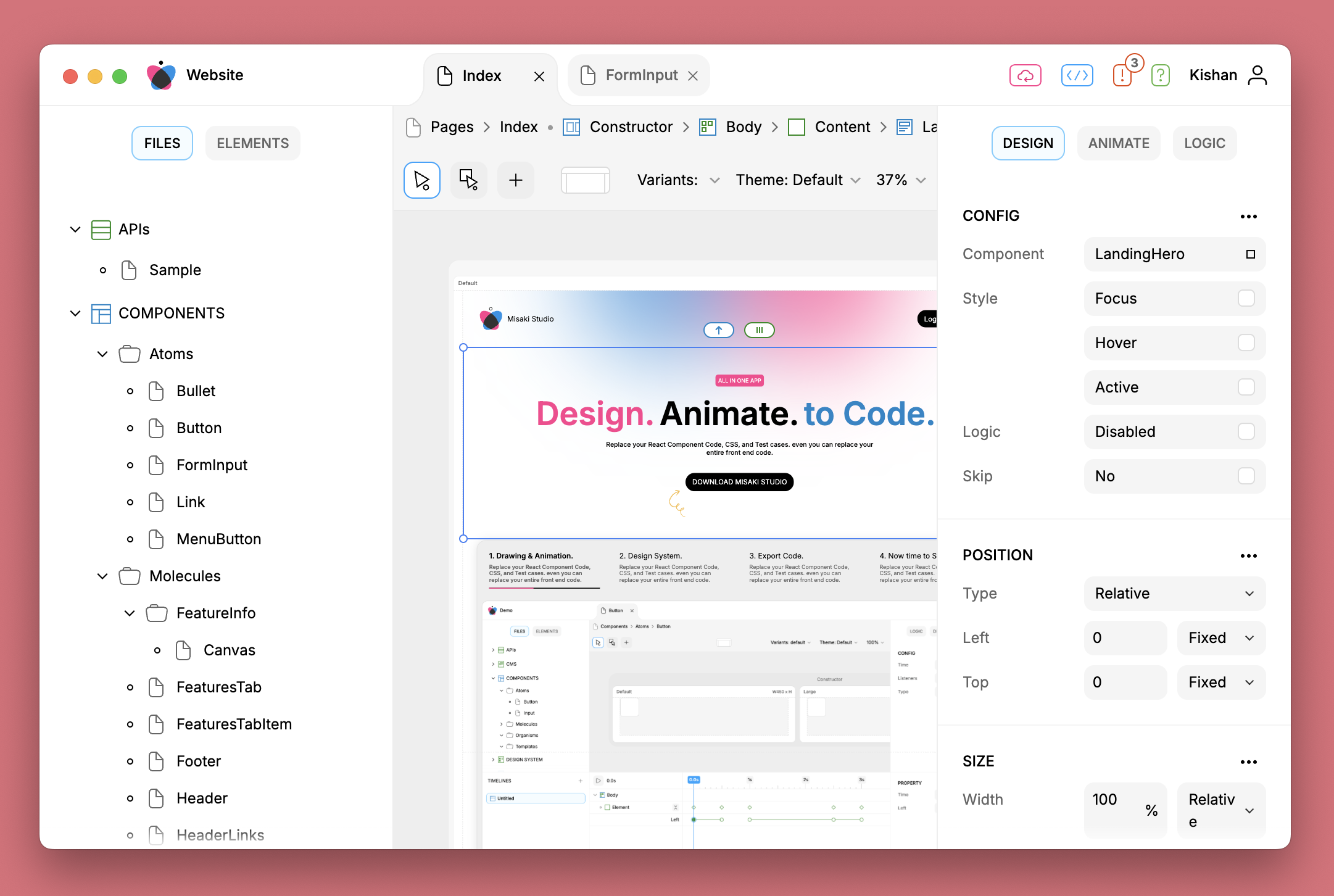
Finally, we’ve built a platform that enables designers to support developers at maximum speed. In Misaki Studio, we’ve created a structured file system with nested sub-file systems inside each root folder. Each sub-file system has its own file types and dedicated controls to manage and operate the files within it.
Here is the list of types in the file system:
APIs
CMS
Components
Design System
Documents
Images
Mockups
Pages
Settings
Storage
As you can see, Misaki Studio is a well-structured solution that enables designers to work efficiently, translate every file carefully and without errors, and export code that is even better than hand-written.