Logic and data
Logic turns a visual hierarchy into a running interface. It binds Component properties, states, events, validators, mounted data, and user interactions to specific elements while preserving a generated React contract that developers can inspect.
The Design canvas shows authored structure and styles. Runtime Preview is where conditions, events, API requests, storage, database views/actions, and state changes actually run.
Three layers of behavior
Component data structure
properties · states · events · validators · mounted sources
                         ↓
Element logic
conditions · bindings · repetition · listeners · actions
                         ↓
Runtime Preview and generated React
rendered DOM · state changes · requests · navigation · output
Read Properties, states, and events for the public contract and internal state model. This page focuses on connecting that data to elements and external sources.
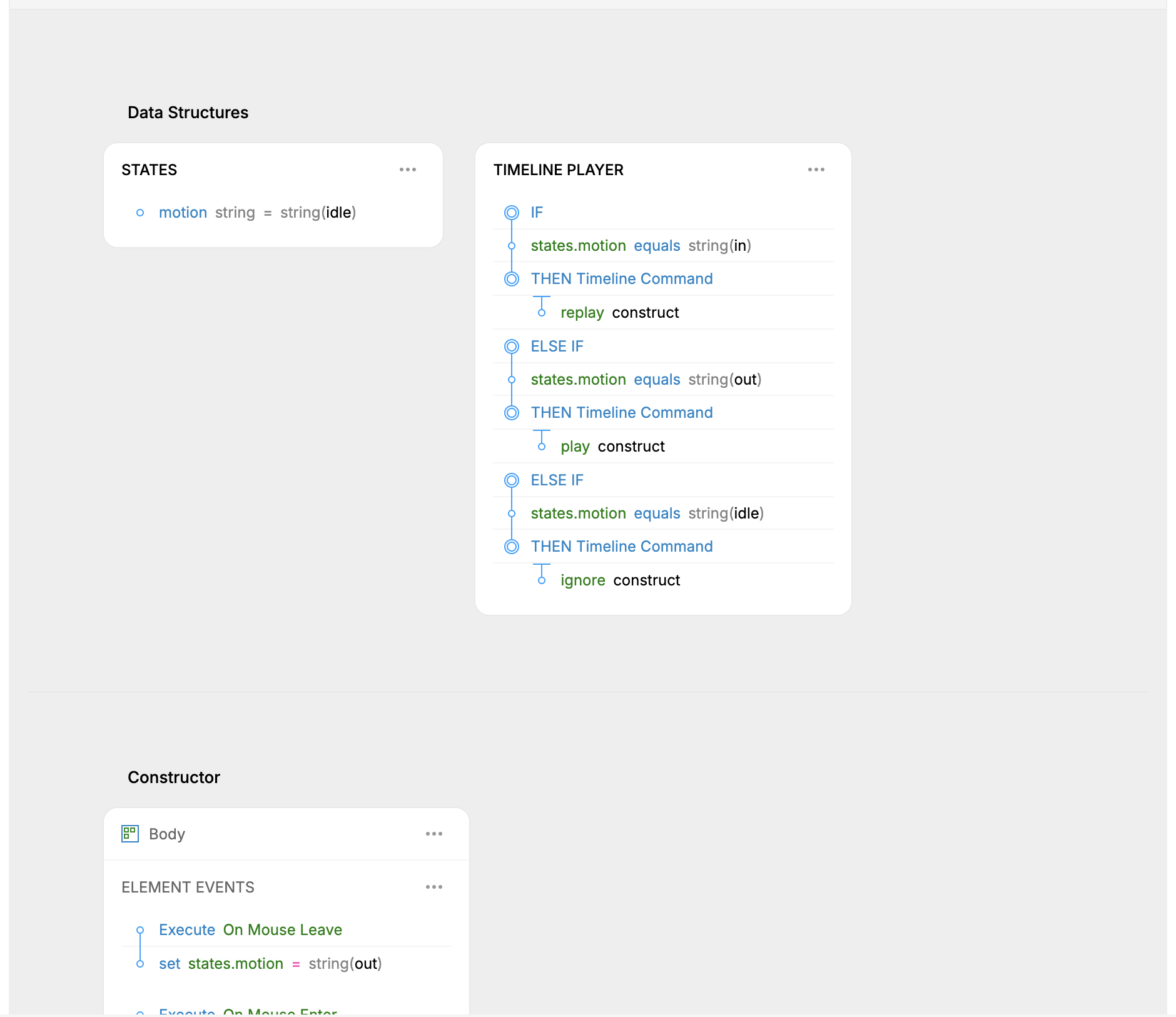
The Website-project pilot shows file-level States and Timeline Player structures alongside selected-element logic. It verified panel routing, not the mutation or runtime behavior taught below.
What element logic can express
Logic area: Condition · Outcome: Render the first branch whose conditions pass, otherwise use the fallback or render nothing.
Logic area: Bind · Outcome: Drive text, input value, image source, or supported inline style fields from an expression.
Logic area: Repeat · Outcome: Render a node for array, object, string, or numeric-range values.
Logic area: Component props/variants · Outcome: Pass typed values and named variants into a child Component instance.
Logic area: Component events/states · Outcome: React to a child's public events or state changes.
Logic area: Element events · Outcome: Run actions on click, double click, mouse, keyboard, change, mount, scroll, focus, blur, state change, interact-outside-popup, appear/disappear, or pointer drag events.
Logic area: Children · Outcome: Fill a child Component slot or render content supplied to the current Component.
Logic area: Attributes · Outcome: Bind supported
data-*,aria-*, role, and other custom attributes.Logic area: Tooltip/cursor · Outcome: Render a referenced floating Component on hover/click or while following the pointer.
Logic area: Parameter/overlay · Outcome: Supply values to a connected screen or overlay.
Logic area: Render timing · Outcome: Delay enter/exit behavior around conditional rendering.
Most bindable slots can be unconditional or contain ordered condition branches. The first passing branch supplies the value; a fallback can supply the result when none pass.
Actions change runtime state or the outside world
Event and timeline actions currently include state assignment and collection operations, calls to declared Component events/functions, Page or URL navigation, focus/blur, scrolling, direct transient style/text writes, audio playback, configured Database actions, and sign-in/sign-out behavior. Sign-in/sign-out can be authored and exercised by the editor Preview, but the current Component exporter emits a TODO instead of client-side authentication code because password verification must happen on a backend.
Use ordinary state changes for durable reactive behavior. Direct style/text actions are intended for high-frequency interactions such as pointer dragging, where updating reactive state on every move would trigger repeated renders, listeners, or requests. Commit the durable value at the end of the gesture, and do not directly write a field that React also owns through a binding.
Navigation, sound, authentication, API calls, and Database write actions can have effects outside the current Component. Preview them only in a safe environment with known data.
Data sources
Source: API · What the file declares: GET/POST/PUT/DELETE endpoint, credentials mode, Config, Headers, Query, Body, Response, and request test cases. · How a Component uses it: Mount the API source and bind the request values. Runtime state exposes response/loading/error information.
Source: Storage · What the file declares: Named typed state schemas, defaults, Memory/Session/Local persistence, and optional API loaders. · How a Component uses it: Mount the Storage file to read/write shared state and loader status.
Source: Content · What the file declares: Typed records and saved, public, parameterless read Views. · How a Component uses it: Mount a saved view. Content is evaluated at export and baked into generated site output.
Source: Database · What the file declares: Typed tables plus saved View, Insert, Update, and Delete definitions with access, parameters, filters, fields, and other configuration. · How a Component uses it: Mount saved Views for reads and select configured actions for runtime writes.
Source: Environment · What the file declares: Project environment values used by generated/request expressions where supported. · How a Component uses it: Reference the configured environment rather than hard-coding deployment values.
Content and Database tables share much of the table editor, but their runtime meaning is different. Content cannot expose write actions, restricted access, or runtime parameters because it is static export-time data. Database behavior depends on the generated/runtime backend and current identity.
Current shipping boundary: Database actions can generate a frontend call to a backend, but the public backend boilerplate's SQL action engine is not ready for production use. Sign-in/sign-out actions are not emitted as working client code, and complete exclusion of Users records and password hashes from frontend export is still marked unfinished. Treat production Database/auth workflows as unfinished, never use real credentials in a documentation or Preview project, and read Backend boilerplate before planning deployment.
Build a small interaction in the editor
Open a Component and choose Logic.
Declare the smallest required property, state, event, validator, or mounted source.
Select the target element in the hierarchy.
Enable only the logic slot needed for the result.
Build references from the declared fields instead of retyping a similar name.
Add one event and a bounded action—for example, toggle
states.openon Click.Bind or condition the visible element from that state.
Open Preview and perform the actual interaction.
Inspect the runtime state/action history and generated output.
Keep public API, internal state, and external data responsibilities separate. For example, a defaultOpen property can initialize states.open, while an onOpenChange event reports the result outward.
Ask an agent to wire and verify logic
Coverage: UI + MCP.
Select the Website project and inspect
<component reference>. Read its data structure, element tree, and existing logic. Add a boolean state namedopenonly if it does not exist. On<trigger element>, add a Click action that toggles that state. Apply a render condition to<content element>so it appears whenstates.openis true. Preserve all existing branches and actions. Read the logic back, usepreview-interactto click the trigger twice, show the before/after state and screenshots, inspect generated output, and run diagnostics.
The agent can combine get-data-structure, get-props-states, add-props-states, get-logic, on-event-action, conditional logic tools or update-logic, preview-interact, get-interpreter-state, get-interpreter-actions, export-code, and get-diagnostics.
Read Target files, folders, and elements before asking an agent to change similarly named nodes.
Mount an external source safely
Before mounting data:
Inspect the API, Storage, Content, or Database file and its typed fields.
Confirm whether the operation is a read, client-state write, network request, or Database mutation.
Create or reuse the saved source/view/action definition.
Mount it into the Component with explicit parameters and request values.
Bind loading, empty, success, and error states.
Preview with safe test data and a known user/session.
Inspect generated imports and the destination's runtime/backend requirements.
MCP operations include mount-data-source, set-api-request, and mount-view, plus the dedicated get-api, get-storage, and table-* file families. table-run-action can execute a real configured action; reading a definition is not authorization to run it.
Debug the runtime model
Use visual proof and logical proof together:
preview-interactperforms a real supported interaction and reports before/after state.get-interpreter-statereturns the live rendered data structure and runtime rows.get-interpreter-actionslists recorded renders and actions.step-interpretermoves the Preview to an earlier recorded state.eval-expressionreads one expression against the live interpreter without running arbitrary JavaScript.DOM, computed-style, measurement, and screenshot tools confirm the visible result.
Node-tree logic is interpreted data, not arbitrary JavaScript. Code Components run authored JavaScript and use a different source-level debugging route.
Conditions and a current preview limitation
Conditions within one branch normally combine as an all-AND group. Stored condition items have an or flag that the exporter understands, but the current Preview interpreter treats the group as all-AND. Until that mismatch is resolved, represent OR behavior as separate ordered branches when Preview parity matters.
Always test the same branch structure in Preview and generated output. A successful static logic read does not prove the intended branch wins at runtime.
Undo, persistence, and external effects
Logic definitions, Component fields, mounts, request bindings, and saved View/action definitions are persisted project content and should participate in their owning file's undo history. Live state, Preview history, browser Storage values, network responses, and current authentication are runtime state.
Undoing a Component edit does not undo a request already sent, a Database write already executed, navigation, an exported file, or browser-persisted data. Use safe environments and the appropriate external recovery mechanism.
Limits and failure states
Design mode does not execute logic; verify in Runtime Preview.
A misspelled or deleted field reference is not repaired safely by guessing; read current generated field IDs and diagnostics.
Conditions, bindings, child props, and mounted values must match their declared datatypes.
Missing API, Storage, Content, Database, Component, Script, or media dependencies can leave generated imports or runtime behavior unresolved.
Content supports only public parameterless read Views and is baked at export time.
Database/auth shipping is unfinished: the public backend cannot yet execute the complete SQL action path, sign-in/sign-out are not emitted as working client code, and Users-data export exclusion still requires verification.
Preview and exporter OR handling currently differ inside a single condition group.
An empty diagnostic result is not a full build, network, authorization, or consuming-application test.