Add interactions and logic
Connect one visible interaction to a small, explicit state transition, then prove it in Preview. Start with the Component's typed data structure, keep each logic branch readable, and separate project behavior from external API or database side effects.
Coverage: UI + MCP, with specific editor-only logic fields.
Model the behavior first
Write the interaction as four facts:
trigger → condition → action → visible result
Example:
Button click → form is valid → submitted = true → confirmation becomes visible
Choose the correct data structure:
a property is supplied by the parent;
a state is owned by the Component while it runs;
an event is emitted to the parent;
a validator provides validity information;
a mounted API, storage source, Content View, or database View makes data references available;
a binding connects those values to visible content or behavior.
Build the interaction in the UI
Open the Component and switch to Logic.
Read existing properties, states, events, validators, mounts, and listeners before adding anything.
Add only the missing typed field or data mount.
Select the trigger element and add the intended element event.
Add a condition only when the action should be gated.
Add the smallest state action, emitted event, navigation, focus/blur, or supported data action.
Bind the resulting value to a visible element state, text, attribute, property, or condition.
Open Preview, perform the real interaction, and inspect the before/after state.
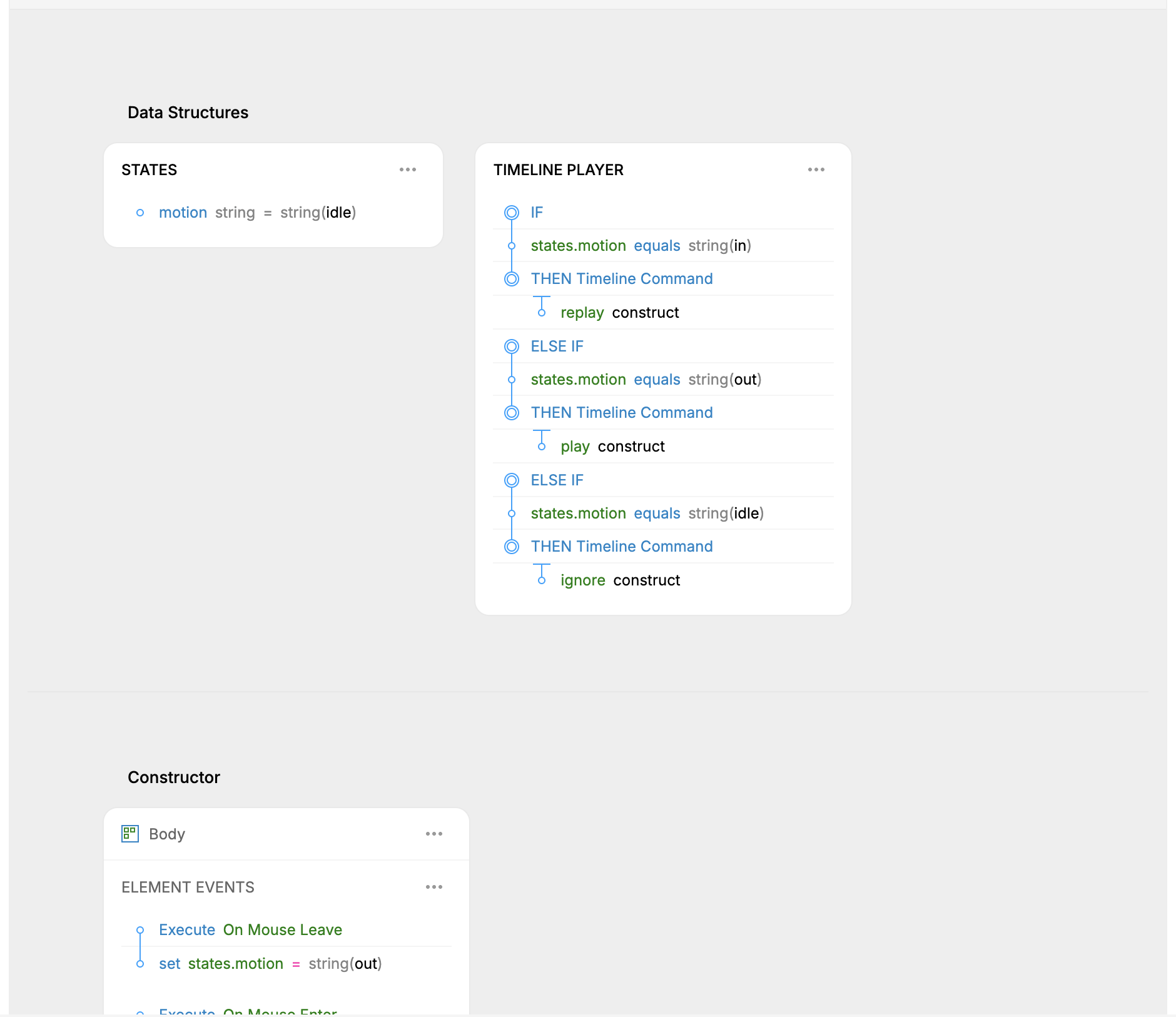
Website-project pilot: a motion state controls commands for the construct timeline. The image proves workspace routing and stored logic, not the runtime result.
Keep branches unambiguous
The editor's current Preview treats all conditions inside one branch as AND. Generated logic honors the stored branch connective, including OR. Until those routes are reconciled, represent alternatives as separate branches when Preview/export agreement matters.
Read an existing configured node or current logic-format guidance before hand-authoring nested expression JSON. Field identities, value paths, and action operands are typed structures, not free-form JavaScript strings.
Ask an agent
In the
Websiteproject, inspect<component reference>and readlogic-format. Reuse the existing<property/state/event/validator>if present; otherwise add exactly<typed field>. On<trigger element reference><interaction>, when<condition>, perform only<action>. Bind the result to<visible target>. Preserve every other branch, listener, binding, timeline, and data mount. Read the data structure and logic back, then usepreview-interactto test the success and non-success paths with before/after screenshots and Context deltas. Inspect generated output and stop without calling an external service.
MCP provides dedicated data-structure, binding, event/action, listener, condition, repeat, mount, and Preview operations. It should use those higher-level operations before falling back to a whole-logic replacement.
Verify behavior, not only configuration
For each branch, verify:
the trigger reaches the intended node;
the condition sees the expected current values;
exactly the intended action runs;
Component state, variables, or emitted events change as expected;
the visible target changes;
the alternate or invalid path does not produce the success result;
generated code represents the same connective and value paths.
Typing in MCP Preview requires the input to be clicked or focused in a prior step. Preview state persists across calls, which is useful for a multi-step form but also means a clean scenario may require reopening or resetting the Preview.
Data and external actions
Content/View data and runtime database actions have different boundaries. A public parameterless View can provide export-time content, while database/API/storage actions may depend on a backend or external runtime.
Do not use real credentials in documentation or Preview. Do not run a write action merely to prove its configuration; use a disposable environment and explicit authorization when a real external mutation is required.
Authentication is currently incomplete as a shipping story: sign-in/sign-out behavior can be authored and exercised in Preview, but the Component exporter emits a TODO rather than a complete client authentication implementation. Public backend action execution and complete exclusion of sensitive Users/password data from frontend output are also unfinished.
Undo and recovery
Data-structure, binding, and element-logic edits are Component content changes and share the file's UI/MCP history. Read the structure before and after one deliberate undo.
A runtime API, database, storage, navigation, or publication side effect is not reversed by undoing the Component definition. Verify and recover that effect at its actual destination.
Current limits
True anchored
node.data.popupconfiguration and listener expressions remain editor-only.One Preview path does not prove every test case, screen, theme, or error response.
Preview and generated output can differ for a branch containing stored OR conditions; separate the alternatives into branches until fixed.
A visually bound external action is not proof that its runtime dependency, permissions, or secret handling are production-ready.