Project interface reference
The Project interface has five stable regions. The selected file determines which editor and inspector appear inside them.
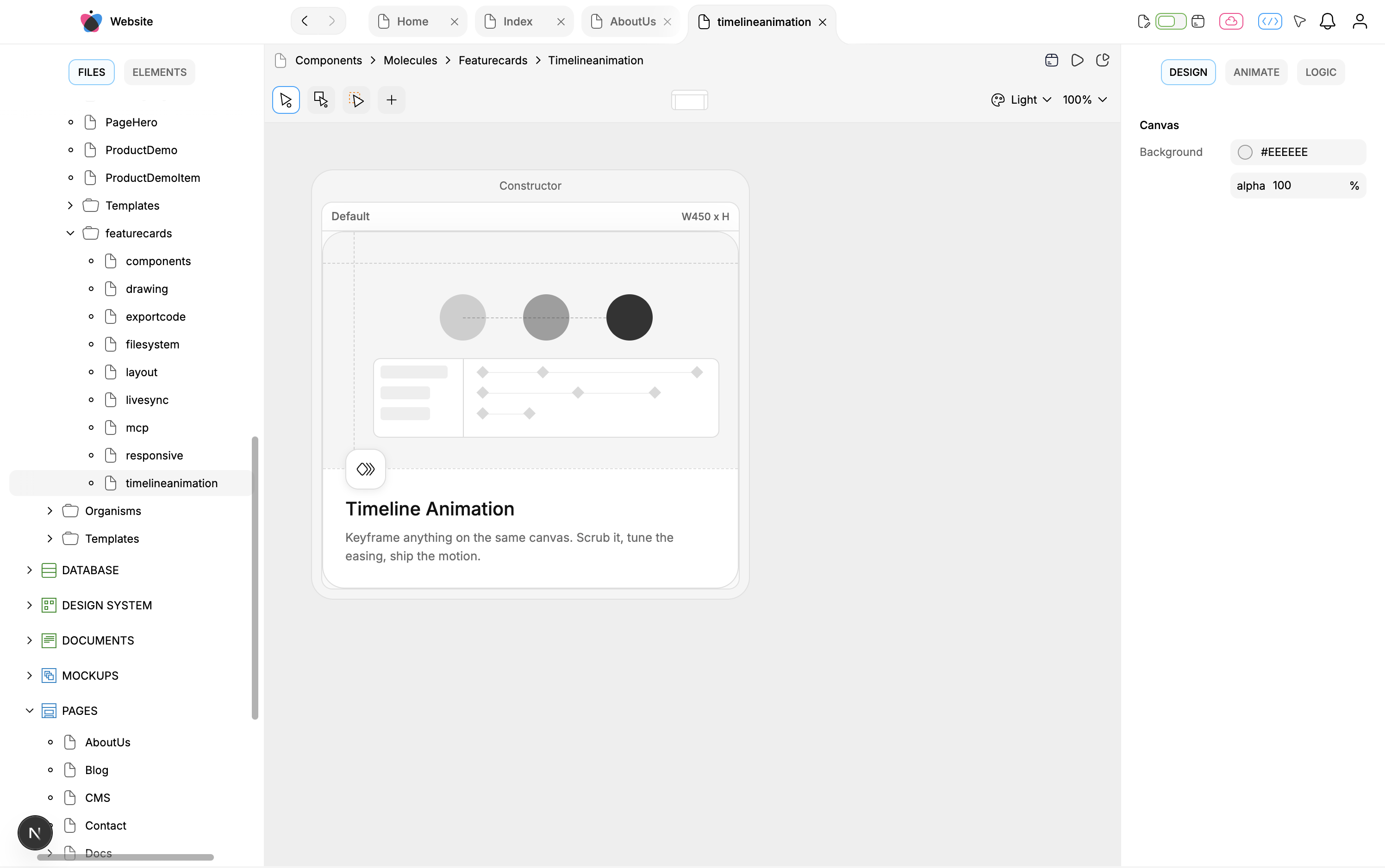
Region: Top bar · Responsibility: project name/menu, Previous/Next file history, tabs, project controls, notifications, account · Persisted content or UI state?: mostly session/project/external actions · MCP relationship: project/file operations exist; tab/history layout is UI-only
Region: Left sidebar · Responsibility: Files project tree or Elements visual hierarchy · Persisted content or UI state?: file/element actions persist; expansion/selection does not · MCP relationship: broad file/tree reads and mutations
Region: Center workspace · Responsibility: selected file renderer · Persisted content or UI state?: depends on file/action · MCP relationship: corresponding file tool family
Region: Right inspector · Responsibility: Design/Animate/Logic, Props, table selection, or Code · Persisted content or UI state?: edited values persist; panel/scroll does not · MCP relationship: broad but property-specific parity
Region: Bottom timeline · Responsibility: timeline layers, segments, keyframes, audio, playback · Persisted content or UI state?: authored timeline persists; panel layout/playhead may be view/runtime state · MCP relationship: timeline operations
Top-bar controls
Project menu: Dashboard and Open Home Screen.
Previous/Next: selected-file navigation history, never content Undo/Redo.
Tabs: select, close, reorder; context actions include Close/Close Other/Close Right/Close Left. Closing never deletes the file.
Ctrl/Cmd+R: reopen the most recently closed tab in the active Editor/Library view.Editor/Library: separate tab stacks and histories.
Cloud menu: Sync Changes, Push Changes, and Template Settings.
Code menu: code preview, local/Git/npm export, npm/Website publication.
Automation and notification controls.
Account Settings currently reports not implemented.
Selected-file routing
File: Page, Component, Mockup · Center/right workspace: canvas with applicable Elements, Design/Animate/Logic, timeline
File: Code Component · Center/right workspace: Logic and Code; no visual hierarchy
File: Database/Content · Center/right workspace: Model/Data/Actions plus Column/Record/View inspector
File: Script · Center/right workspace: Logic declarations and Code
File: Document · Center/right workspace: rich-text editor
File: Document Page · Center/right workspace: route tree/SEO editor
File: API/Storage · Center/right workspace: request/state schema editors
File: Design-system/media · Center/right workspace: cards/list plus Props
File: Export/Environment · Center/right workspace: settings editors
File: Libraries/General · Center/right workspace: no ordinary selected-file center renderer
Resizing and fullscreen
Left, right, and bottom regions can be resized. Side sizes are user preferences; double-click restores defaults. Fullscreen hides surrounding chrome for the selected workspace. These are not project content and have no production MCP equivalent.
State and recovery
Use file Undo for eligible selected-file content. File-system actions, sync/push, export, publishing, project selection, open tabs, and panel state have different recovery boundaries. See the full Project interface guide.